
[1.2.4] - 2026-04-27
✨ Added
- Advanced Download Tool: A new export engine that runs entirely in the background.
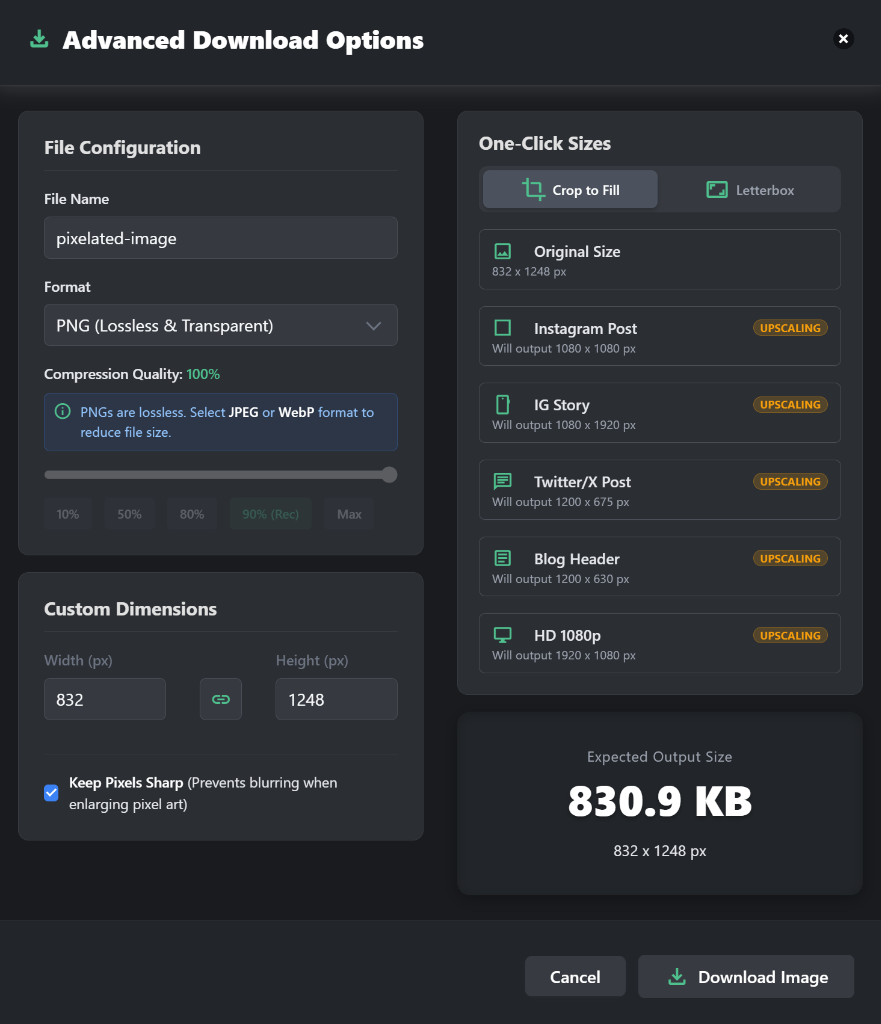
- Social Media Presets: One-click sizing for Instagram, Twitter/X, Blog Headers, and HD 1080p.
- Smart Aspect Ratios: "Crop to Fill" and "Letterbox" modes to fit any image into social presets.
- Keep Pixels Sharp: Nearest-neighbor upscaling for pixel art to prevent blurring.
- Real-time Estimation: File size and dimension preview updates as you tweak quality and settings.
- Background Processing: Moved image encoding to a Web Worker so the UI stays responsive during heavy processing.
- New Export Formats: Added more formats to Advanced Download:
- GIF: High-quality export with 256-color quantization. Lazy-loaded to keep things snappy.
- SVG: Wraps the image in an SVG envelope, handy if you're moving assets into Figma or Illustrator.
- ICO: Exports a favicon-ready .ico file with 16x16, 32x32, and 48x48 sizes baked in.
- Contextual Info Banners: Added small info alerts in the Advanced Download modal for GIF, SVG, and ICO so users know what to expect.
🔄 Changed
- Format Support Docs: Updated references around the site to reflect the 9 export formats now available.
- HEIC Clarification: Marked HEIC as input-only since browsers can't encode it yet, was causing some confusion.
[1.2.3] - 2025-12-02
✨ Added
- Auto Color Match for Emojis: Added "Auto 🎨" mode to Emoji Pixelation.
- Automatically selects emojis based on the underlying image color.
- Expanded color palette recognition for better matching.
⚡ Performance
- Emoji Rendering Optimization: Implemented caching for emoji rendering.
- Significantly improved performance when pixelating with emojis.
[1.2.2] - 2025-01-27
✨ Added
- Sample Images Strip: Enhanced user experience with quick-start samples
- Added "No image? Try one of these" sample strip under hero comparison
- Click-to-load functionality with auto-scroll to editor
- Uses existing before-* images as sample thumbnails
- Google Analytics tracking for sample image clicks
- Upload Method Microcopy: Improved user guidance
- Added helpful hints: "Drop anywhere on page" and "Paste with Ctrl+V / Cmd+V"
- Cross-platform keyboard shortcut support (Windows/Mac)
- Subtle styling with bullet points for clean appearance
- Enhanced Image Alt Text: SEO-optimized with intent keywords
- Updated alt text with "pixelate face", "pixelate image online" keywords
- Improved accessibility and search engine visibility
- Applied to comparison images, sample thumbnails, and editor images
- Page-Specific JSON-LD Schema: Advanced SEO implementation
- WebApplication schema for home and invert pages
- Clean, focused structured data for better search visibility
🔄 Changed
- Canonical URL Strategy: Complete overhaul for better SEO
- Implemented template variable system in build configuration
- Page-specific canonical URLs for all pages (home, invert, flip, about, etc.)
- Updated Twitter and Open Graph URLs to match canonical URLs
- Single source of truth in build.js for easy maintenance
- HTML Structure Improvements: Better semantic markup
- Fixed duplicate H1 headings issue (header nav changed to div)
- Proper heading hierarchy with single H1 per page
- Improved accessibility and search engine crawling
🐛 Fixed
- Service Worker Cache: Updated for new sample images
- Added sample images to cache for offline functionality
- Bumped cache version to v1.2.2 for proper cache refresh
[1.2.1] - 2025-01-27
✨ Added
- Beads Pattern Integration: Enhanced Classic Modes section
- Added Beads pattern to Classic Modes content display
- Updated section to show all 5 core pixelation patterns
- Improved visual consistency across all mode interfaces
🔄 Changed
- Mode Count Updates: Updated all references from "10+" to "12+" creative pixelation modes
- Hero section caption now shows "12+ creative effects"
- Features section updated to "12+ Creative Modes"
- Pixelation modes section title updated to "12+ Creative Pixelation Modes"
🐛 Fixed
- Solid Color Field Visibility: Critical fix for color picker functionality
- Fixed solid color field not showing when "Solid Fill" mode is selected
- Added proper ID targeting for reliable field visibility control
- Fixed localStorage settings not triggering color field visibility on page load
- Ensured color picker works with both dropdown selection and pattern button clicks
- Improved initialization timing to prevent race conditions
⚡ Improved
- User Experience: More reliable color selection workflow
- Visual Consistency: Better alignment between interface elements and content descriptions
- Settings Persistence: Enhanced localStorage integration for color preferences
[1.2.0] - 2025-10-09
🎨 Design
- Homepage Redesign: Complete visual overhaul of the homepage
- Modern, clean hero section with better visual hierarchy
- Improved before/after image comparison showcase
- Enhanced feature cards with clear value propositions
- Better mobile responsiveness and user experience
- Updated typography and spacing for improved readability
✨ Added
- New Visual Elements:
- WebP format images for better performance (before.webp, after.webp)
- Optimized image assets reducing page load size by ~80%
- Enhanced CSS styling with modern design patterns
⚡ Improved
- User Experience: More intuitive layout and navigation
- Performance: Faster page load with optimized images
- Visual Appeal: Professional and modern design aesthetic
[1.1.2] - 2025-10-08
✨ Added
- Inverse Pixelation Mode: Revolutionary new feature for selective clarity
- Pixelate everything outside your selection area
- Keep your subject clear while blurring the background
- Perfect for privacy protection while maintaining context
- Ideal for highlighting specific areas in images
- Easy toggle with "Inverse Pixelation" checkbox
💡 Use Cases
- Privacy Protection: Keep a person/object clear while pixelating the background for privacy
- Focus Enhancement: Draw attention to specific areas by blurring surroundings
- Selective Censoring: Protect background information while showing the main subject
- Creative Effects: Create unique artistic compositions with selective pixelation
- Document Redaction: Blur sensitive areas while keeping important details visible
⚡ Improved
- User Control: More flexibility in how pixelation is applied
- Workflow: Faster censoring workflows for complex images
[1.1.0] - 2025-10-07
✨ Added
- Offline Support: Full Progressive Web App (PWA) functionality with service worker
- Works completely offline after first visit
- Caches all static assets for offline use
- Material Icons fonts cached for offline display
- Connection Status Indicator: Visual indicator in header when offline (📶 emoji)
- Auto-Save Settings: User preferences automatically saved to localStorage
- Pixel size, mode, intensity, color variation, and fill color persist across sessions
- Settings restored on return visits
- Smart Notifications: Toast notifications for connection status changes
- Background Sync: Offline queue system for future enhancements
🔄 Changed
- Service Worker Registration: Automatic registration with update detection
- Build Process: Enhanced to include service worker deployment
⚡ Improved
- Font Caching: Robust Material Icons font caching with fallback system
- Error Handling: Better service worker error handling and logging
- User Experience: Cleaner UI with offline indicator only showing when needed
[1.0.1] - 2025-01-27
✨ Added
- 404 error page with user-friendly design and navigation options
- Popular pages section on 404 page showcasing main tools
- Help section with troubleshooting tips for 404 errors
🔄 Changed
- Improved Twitter card configuration for better social media previews
- Enhanced Open Graph meta tags for better social sharing
🐛 Fixed
- Twitter preview image optimization and sizing issues
- Added proper Twitter card alt text for accessibility
[1.0.0] - 2025-08-16
Initial release of the static site for Pixelate Image
Pixelate Image (Image Pixelator)
- Core pixelation workflow with real-time preview, adjustable pixel size, and multiple overlays
- Advanced modes: circular, hexagonal, triangular, emoji, ASCII, mosaic, glass/crystal, glitch, gradient, fractal, wave, spiral, voronoi, perlin, solid fill
- Download options: PNG, JPEG, WebP, BMP, TIFF, AVIF, GIF, SVG, or ICO with quality controls
Invert Image Colors
- Dedicated page and script to invert image colors with client-side processing
UI/UX
- Responsive layout with sidebar controls, toolbars, and keyboard shortcuts
- Theme system with light/dark mode and instant theme application
Privacy & Security
- 100% local processing; no image uploads or server-side storage